Apple Music Replay 2025: How to Get Your ‘Wrapped’ Stats (UK)
It’s that time of year again. Your Instagram Stories and TikTok feed are likely flooded with colourful graphics, listening personalities, and “Top 1% of Listeners” badges from your friends on Spotify. If you are an Apple Music subscriber in the UK, you might be staring at your phone wondering, “Where is mine?”
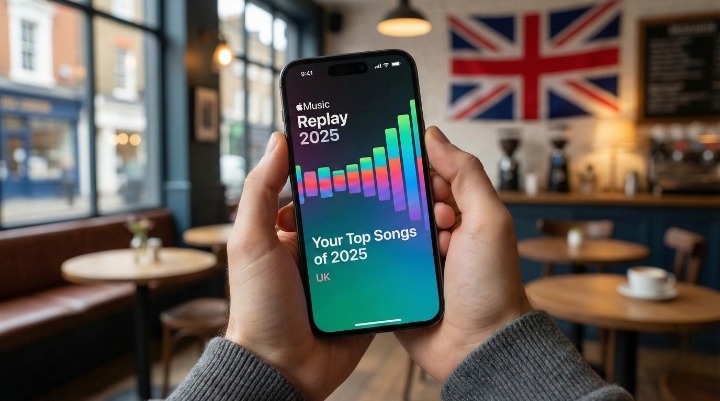
The good news is that you don’t have to miss out on the year-end fun. Apple Music Replay 2025 is officially live, and it offers a deep dive into your streaming habits that rivals, and in some ways, beats—the competition.
However, unlike Spotify’s in-your-face pop-ups, Apple’s annual recap can be surprisingly hard to find if you don’t know where to look. It requires a bit of navigation, and for some users, a specific settings tweak to get it working.
This guide is your complete walkthrough. We will cover exactly how to access your Apple Music Replay 2025 on your iPhone and the web, how to troubleshoot common “missing stats” glitches, and how your British music taste compares to the Official Charts Company’s data for the UK this year.
What is Apple Music Replay 2025?
Before we jump into the “how-to,” let’s clear up a common confusion. Many users search for “Apple Music Wrapped,” borrowing the term from Spotify. Apple’s version is officially called Apple Music Replay.
While the concept is similar, a nostalgic look back at your year in audio, the execution is different. Spotify Wrapped is a once-a-year event. Apple Music Replay is actually a year-round feature. It updates weekly (usually on Sundays), allowing you to track your top songs, artists, and albums as the year progresses.
But for December 2025, Apple has rolled out the “Year-End Experience.” This is the polished, shareable “Highlight Reel” that gives you:
-
Your Personal Top 100 Songs Playlist: A dedicated mix of your most-streamed tracks.
-
Milestones: Badges for hitting specific minute-counts (e.g., 5,000 minutes listened).
-
Listening Personality: A categorisation of your music vibe based on genre diversity.
[Official Apple Newsroom – New Features in Apple Music]
How to Find Your Apple Music Replay Stats (Step-by-Step)
Apple offers two distinct ways to view your stats: a quick visual summary inside the app, and a data-heavy dashboard on the web. Most guides conflate the two, but knowing the difference is key to getting the full picture.
1. Viewing the ‘Highlight Reel’ on iPhone (The App View)
This is the version designed for social media. It’s snappy, visual, and mobile-optimised.
-
Open the Apple Music app on your iPhone or iPad.
-
Tap on the Home tab (bottom left corner).
-
Pro Tip: Do not stop at the “Recently Played” or “New Releases” sections. You need to scroll down significantly.
-
Look for a section titled “Replay: Your Top Songs by Year”.
-
You should see a colourful banner that says “2025 Replay”. Tap it.
-
This launches the “Highlight Reel”, a vertical, story-style animation showing your top artist and total minutes.
2. The Deep Dive: Using the Web Dashboard
If you are a data nerd, the app view might feel a bit light. For the real insights, like exactly how many times you played that one specific song, you need the web dashboard. This is often where the “missing” data lives.
-
Open your browser (Safari, Chrome, or Edge) on your phone or desktop.
-
Go to replay.music.apple.com.
-
Sign in with your Apple ID.
-
Once logged in, you get a comprehensive dashboard.
Why use the web version? The web dashboard provides granular details the app hides. You can see your exact play counts for your top 100 songs, not just the top 5. It also allows you to see precise listening hours split by artists and albums. If you are trying to win an argument about who listened to Oasis more this year, this is the tool you need.
Why Can’t I See My Replay? (Troubleshooting Common Glitches)
This is the most common frustration we see in user forums. You open the app, you scroll down, and… nothing. Or maybe you visit the website and see a “Not Enough Data” error.
Based on our testing and Apple’s support documentation, here are the two most likely culprits and how to fix them.
Fix 1: Check Your ‘Use Listening History’ Settings
If this setting is turned off, Apple Music isn’t tracking your streams. This often happens if you share a device with a family member and turned it off to prevent their taste from ruining your recommendations.
-
How to check: Go to your iPhone Settings > Music.
-
The Fix: Scroll down to the bottom and ensure the toggle for Use Listening History is distinctively Green (On).
Note: If this was off for the majority of 2025, you cannot retroactively recover that data. Turning it on now will start tracking for Replay 2026.
Fix 2: The ‘Not Enough Data’ Threshold
Apple prioritises privacy and accuracy. Apple Support states that if you haven’t listened to enough music, Replay won’t generate to avoid creating a skewered profile.
While Apple doesn’t publish the exact “magic number,” user reports suggest you need to have hit a threshold of roughly 500 to 1,000 minutes of listening time across a variety of artists. If you only subscribed in November, or if you primarily listen to local radio stations via the app (which often don’t count towards Replay stats), you might see the “Not Enough Data” warning.
New Features in 2025: Milestones & Monthly Insights
Apple has been playing catch-up with Spotify’s gamification, and 2025 sees some solid improvements.
Milestones: New for this year, you might see badges for hitting listening streaks. Did you listen every day for 20 weeks straight? There is a badge for that. These milestones are designed to make you feel accomplished about your consumption habits.
Monthly Insights: Previously, Replay was just a playlist that updated quietly. Now, Apple provides a mini-recap at the end of every month. It’s worth checking your Replay hub on the first Sunday of every month to see how your taste shifts from winter gloom to summer anthems.
Top Songs of 2025: The UK vs. The World
Your personal stats are interesting, but how do you compare to the rest of the United Kingdom?
The Official Charts Company tracks music consumption across the UK, and their data highlights a distinct difference between British listeners and the global average.
Most Streamed Songs in the UK (2025 Trends)
While global charts are often dominated by massive US pop stars, UK listeners in 2025 leaned heavily into domestic talent and specific genres.
-
Domestic Dominance: British artists continue to hold strong positions in the top 10, specifically in the grime and alternative pop sectors.
-
The Oasis Effect: With the reunion tour announcement earlier this year, legacy tracks like “Wonderwall” and “Don’t Look Back in Anger” saw a massive spike in streams, re-entering the Replay charts for thousands of Gen Z and Millennial listeners.
Global Apple Music Hits
Globally, the trends were more uniform, with major international acts (think Taylor Swift, Bruno Mars, and viral TikTok hits) taking the lion’s share of streaming minutes.
Comparing your Replay 2025 to the UK Top 100 is a great way to see if you are a trendsetter or a follower. You can find the official “Top Songs of 2025: UK” playlist directly in the Apple Music app under the “Browse” tab.
How to Share Your Stats on Instagram & TikTok
Apple has made sharing slightly easier this year, though it still lacks the one-tap video integration of Spotify.
-
Open your Replay Highlight Reel (as described in the first section).
-
When you land on a card you want to share (e.g., your Top Artist), look for the Share Icon (the square with the arrow pointing up) at the bottom right.
-
Select Instagram Stories, TikTok, or Save Image.
-
Pro Tip: Apple exports these as static images. To make them engaging on TikTok, use the “Photo Mode” and add the actual song from your top artist as the background audio.
FAQs
Here are the answers to the most common questions people are asking about Apple Music Replay 2025 right now.
How do I see my Apple Music Replay 2025?
You can view it in the Apple Music app under the “Home” tab (scroll to the bottom) or by visiting replay.music.apple.com for a detailed dashboard.
Does Apple Music have a Wrapped like Spotify?
Yes, but it is called Replay. It offers similar stats like top songs, artists, and minutes listened, but it updates weekly throughout the year rather than just once in December.
Why is my Apple Music Replay not updating?
This is usually because “Use Listening History” is turned off in your iPhone settings, or you haven’t listened to enough music yet to generate data.
How to check total minutes listened on Apple Music?
The most accurate way is via the web dashboard (replay.music.apple.com). The mobile app “Highlight Reel” shows this too, but the website keeps the data visible permanently.
When does Apple Music Replay update?
Your Replay playlist updates weekly, typically on Sundays. The year-end “Highlight Reel” usually launches in late November or early December.
Can I see my Replay stats offline?
You can download your “Replay 2025” playlist for offline listening, but to view the stats dashboard and animations, you must have an active internet connection.
Is Apple Music Replay accurate?
It is highly accurate regarding streams, but it excludes music played from your local library (MP3s you uploaded yourself) and radio station plays. It strictly counts streams from the Apple Music catalogue.
How do I add my Replay 2025 playlist to my library?
In the Replay section, you will see your “Replay 2025” playlist. Simply tap the + Add button in the top right corner to save it permanently to your library.
Final Thoughts: What Was Your Soundtrack to 2025?
Apple Music Replay 2025 is a powerful tool for self-reflection. It cuts through the noise and shows you exactly what you loved this year, not what you said you loved to look cool.
While the interface might still lag slightly behind Spotify’s viral polish, the depth of data available on the web dashboard offers a fascinating insight into your daily life. From the heartbreak ballads of February to the summer road-trip anthems of July, it’s all there in the data.
Now it’s your turn. Check your Replay mix. Did a UK artist take your top spot, or did a global superstar dominate your ears? Drop a comment below or share your top artist on social media, and don’t forget to tag us!
About the Author