Hive Thermostat Offline? Manual Reset & Reconnection Guide for 2026
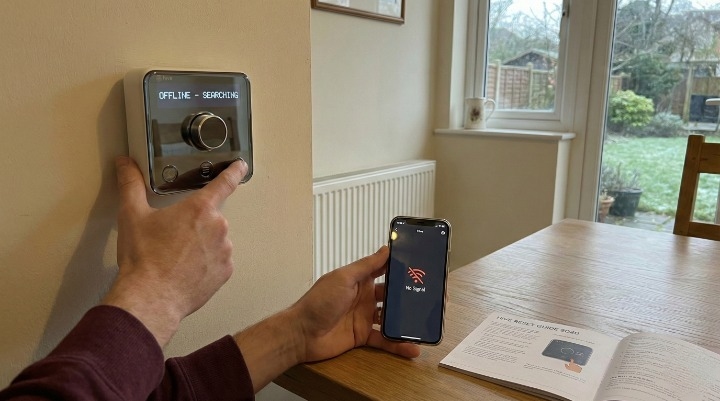
Waking up to a freezing house because your Hive app shows “Offline” or your thermostat displays “No Signal” is a frustration most UK homeowners know well. It usually happens on the coldest mornings when you need your central heating the most.
While it is tempting to call out a British Gas engineer immediately, most Hive connectivity issues are caused by temporary Zigbee signal interference or minor firmware “hangs.” You can usually fix these yourself in under 15 minutes.
This guide provides the 2026-validated manual reset and pairing instructions for every Hive model, including the newer Thermostat Mini.
Why is My Hive Thermostat Offline? (The 2026 Diagnostic)
Before you start pulling batteries, it helps to identify exactly where the link has broken. In a standard Hive Active Heating setup, three devices must communicate: the Hive Hub (plugged into your router), the Receiver (wired to your boiler), and the Thermostat (on your wall).
The “Broken Link”: Is it the Hub, Receiver, or Thermostat?
-
App says “Offline”: This usually points to the Hive Hub or your home internet. Check if your router is working first.
-
Thermostat says “No Signal”: This means the thermostat has lost its Zigbee connection to the receiver box near your boiler.
-
Status Light on Receiver is Red: The receiver cannot communicate with the hub, even if the thermostat is working locally.
Battery Depletion: AA (Standard) vs. AAA (Mini)
High-quality batteries are essential. A common mistake I see is using rechargeable batteries. These often have a lower voltage ($1.2\text{V}$) compared to standard Alkaline ($1.5\text{V}$), which can weaken the RF signal and cause frequent “Offline” drops. For 2026, I recommend using high-power Lithium AA batteries for the SLT3 and AAA for the Mini to ensure a stable connection through thick UK masonry walls.
Immediate Fix: How to Manually Override Your Heating
If it is late at night and you just want the house warm, you do not need the app. You can bypass the smart system entirely using the receiver box located next to your boiler.
Heating Engineer’s Pro-Tip: > Find the white Hive box wired to your boiler. Press the Central Heating button once. A green light will appear, and your boiler will fire up manually. This “Manual Override” stays on until you press the button again or the system reconnects. It is a lifesaver during a cold snap.
Step-by-Step Hive Thermostat Manual Reset Instructions
If the manual override works but the app is still dead, you need a full reset. Follow these steps for your specific model.
1. How to Reset the Hive SLT1 & SLT3 (Silver Dial)
The SLT3 is the most common model in the UK.
-
Remove the thermostat from the wall bracket by pressing the tab at the bottom.
-
Take one battery out.
-
On the thermostat, press and hold the Back button and the Menu button (bottom-left and middle-bottom) simultaneously.
-
While holding them, put the battery back in.
-
Continue holding until the screen shows “Factory Reset” and counts down from 10.
-
Once it reaches zero, the screen will show “Searching.”
2. How to Reset the Hive Thermostat Mini
The Mini has a touch interface and requires a slightly different approach:
-
Remove the Mini from its backplate.
-
Remove all four AAA batteries.
-
Hold down the back arrow and menu icons on the front of the device.
-
Reinsert the batteries while keeping your fingers on the icons.
-
Wait for the reset animation to complete and the screen to display “Searching.”
3. Power Cycling the Hive Hub
If your Hub is showing a solid red light or flashing amber for hours:
-
Unplug the power cable from the back of the Hub.
-
Unplug the Ethernet cable from your router.
-
Wait 30 seconds.
-
Plug the Ethernet back in first, then the power.
-
Wait 5–10 minutes. A solid green light on a Nano 2 or 3 Hub means it is back online.
Understanding Receiver LED Lights (The “Secret” Codes)
The light on your receiver box is the best diagnostic tool you have.
| Light Colour | What it Means | Action Required |
| Solid Green | Everything is perfect. | No action needed. |
| Flashing Amber | Pairing mode. | The device is looking for the Hub. |
| Double Amber Flash | Searching for Thermostat. | Put the Thermostat in pairing mode. |
| Flashing Pink/White | Standalone Mode. | Hold the Central Heating button for 10s to exit. |
| Solid Red | Lost connection to Hub. | Power cycle the Hive Hub. |
What is “Standalone Mode”?
If your receiver flashes Pink or White, it is in Standalone Mode. This means the thermostat can talk to the boiler, but the App cannot. This usually happens after a power cut. To fix this, you must hold the Central Heating button on the receiver for 10 seconds until it flashes Amber, then re-pair it with the Hub.
The Reconnection Sequence: Pairing Devices in Order
To successfully reconnect your Hive thermostat to the hub, you must follow a specific order. If you pair them out of sequence, the “No Signal” error often returns.
-
Isolate the Boiler: Switch off the power to your boiler at the fused spur (the wall switch with a fuse). All lights on the Hive receiver should go out.
-
Reset the Hub: Unplug and replug the Hub as described above.
-
Put Hub in Pairing Mode: Open your Hive app, go to Manage Devices > Install Devices > Add Heating. The Hub light will flash amber.
-
Power the Boiler Back On: Switch the fused spur back on.
-
Reset Receiver: Hold the Central Heating button on the receiver until the light flashes pink, then release and hold again until it double-flashes amber.
-
Reset Thermostat: Follow the “Factory Reset” steps for your model (SLT3 or Mini) now.
-
Wait for the “Search”: When the thermostat finds the receiver, the light on the receiver will turn solid green, and the thermostat will display the room temperature.
Advanced Troubleshooting: Persistent “No Signal” Errors
If your Hive keeps going offline every few days, the issue is likely range or interference.
-
Zigbee Channel Conflicts: Hive uses Zigbee, which operates on the same $2.4\text{GHz}$ frequency as your Wi-Fi. If you recently bought a new high-power mesh router (like Eero or TP-Link Deco), it might be “drowning out” the Hive signal. Try moving your Hive Hub at least 1 metre away from your router.
-
The “Metal Barrier” Problem: If your receiver is tucked behind a heavy metal boiler casing or inside a cupboard with foil-backed insulation, the signal will struggle. You may need a Hive Signal Booster plugged into a socket halfway between the Hub and the boiler.
When to Call a British Gas Engineer
Manual resets solve $95\%$ of connectivity issues. However, if you see no lights at all on the receiver box even when the power is on, the internal fuse or the receiver hardware itself may have failed. Since the receiver is wired directly into the $230\text{V}$ mains, you should not attempt to open the casing. At this point, contact Hive Support or a Gas Safe registered engineer to inspect the wiring.
FAQs
Why is my Hive thermostat showing offline on the app but the heating is on?
This happens when the Hub has lost internet connection, but the Thermostat and Receiver are still paired locally. Your schedules will still work, but you cannot change them via your phone.
How do I manually reset my Hive receiver box?
Turn the boiler off at the switch. Turn it back on. Hold the Central Heating button for 10 seconds until the light flashes pink, then repeat until it flashes amber.
What does a flashing amber light mean on my Hive receiver?
It means the receiver is in “Pairing Mode” and is actively looking for a Hive Hub to connect to.
How do I put a Hive Thermostat Mini into pairing mode?
After a factory reset (holding back and menu icons while inserting batteries), it will automatically enter pairing mode and display a “Searching” icon.
Final Thought
Don’t panic when the “Offline” notification pops up. In most cases, a simple power cycle of the Hub and a battery refresh on the thermostat will solve the problem. Remember to always use high-quality Alkaline batteries—cheap ones are the leading cause of “No Signal” errors in 2026.
About the Author