Best Budget Gaming Monitor UK Under £200: Top 7 Picks (2025 Review)
High-performance gaming usually drains your wallet. But in 2025, the UK hardware market has shifted. You no longer need to drop £400+ to get buttery smooth gameplay, accurate colours, and faster response times.
We are seeing a massive “trickle-down” effect in tech. Features that were premium three years ago, IPS panels with high contrast, 1ms response times, and adaptive sync, are now the baseline standard in the sub-£200 bracket. Whether you are a student setting up a dorm battlestation, a competitive Valorant player, or a console gamer looking to unlock 120Hz on your PS5, the budget tier has never looked better.
I have analyzed the current UK market availability, cross-referenced technical panel data, and stripped away the marketing jargon to bring you the definitive list. We prioritized verified UK stock, panel performance (specifically ghosting tests), and the “hidden costs” most reviews conveniently ignore.
Here is your guide to the best budget gaming monitor UK under £200.
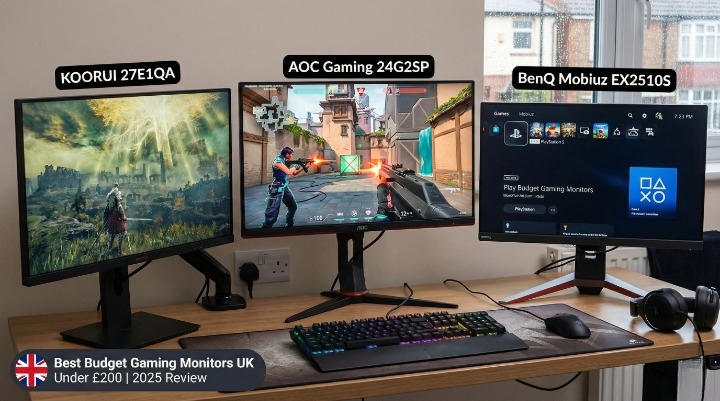
Quick Comparison: Top 3 Budget Monitors at a Glance
If you are in a rush to complete your setup, here are the top three contenders that consistently dominate the UK market for value.
| Feature | AOC Gaming 24G2SP | KOORUI 27E1QA | BenQ Mobiuz EX2510S |
| Best For | Best Overall (The King) | Best Budget 1440p | Best Console/Audio |
| Resolution | 1920 x 1080 (FHD) | 2560 x 1440 (QHD) | 1920 x 1080 (FHD) |
| Refresh Rate | 165Hz | 144Hz | 165Hz |
| Panel Type | IPS | VA | IPS |
| Stand | Height Adjustable | Tilt Only | Height Adjustable |
| Approx Price | ~£139 | ~£155 | ~£169 |
What to Expect for Under £200? (Buying Guide)
Before we jump into the reviews, you need to understand what your money actually buys in 2025. Manufacturers love to slap “1ms” and “HDR” on every box, but the reality is often different. Here is the technical breakdown.
1080p vs. 1440p: The Sweet Spot
For a budget under £200, 1080p (Full HD) at 24 inches is still the king of competitive gaming.
Why? Because pixel density matters. A 24-inch 1080p screen looks sharp. A 27-inch 1080p screen looks pixelated and blocky because the pixels are stretched over a larger area. Unless you find a rare deal on a 1440p monitor (like the Koorui listed below), stick to 24-inch 1080p for the crispest image.
Panel Types: IPS vs. VA vs. TN
You will see three main acronyms. Here is the real-talk difference:
-
IPS (In-Plane Switching): The gold standard for 2025. Great colours, wide viewing angles, and fast response times. Pick this for: FPS games (Call of Duty, Overwatch) and general use.
-
VA (Vertical Alignment): Offers incredible contrast. Blacks look truly black, not grey. However, budget VA panels often suffer from “black smearing” (ghosting) in dark scenes. Pick this for: Single-player RPGs (Elden Ring, Cyberpunk) or movies.
-
TN (Twisted Nematic): Old tech. Very fast, but colours look washed out. Unless you are in the top 1% of CS:GO players, avoid TN panels in 2025. They just don’t look good.
The “Hidden Costs” of Budget Monitors
This is where most buyers get stung. When buying a budget monitor in the UK, watch out for these two things:
-
The “Cable Tax”: Many budget monitors (especially from Acer and ASUS) ship with an HDMI cable, but not a DisplayPort cable. To get G-Sync or the full 165Hz on PC, you often need DisplayPort. You might have to spend an extra £10 on a cable immediately.
-
The Desk Footprint: Budget monitors often have massive V-shaped legs to compensate for cheap plastic build quality. If you have a shallow desk (common in UK university halls or small flats), these stands can eat up your mouse mat space.
The 7 Best Budget Gaming Monitors in the UK (2025)
1. AOC Gaming 24G2SP (Best Overall 1080p)
Specs: 24″ | 1080p | 165Hz | IPS | 1ms MPRT
The AOC 24G2 (and its updated version, the 24G2SP) is widely considered the benchmark for budget 1080p gaming. It does almost everything right for a price that usually hovers around £140.
Why It Wins:
The panel quality punches way above its weight class. According to extensive testing by Rtings, the contrast ratio on this specific IPS panel often hits around 1400:1, which is significantly better than the standard 1000:1 found on LG or ASUS competitors. This means blacks look deeper and colours pop more.
Crucially, it comes with a fully ergonomic stand. You can adjust height, tilt, swivel, and even rotate it vertically. Most sub-£150 monitors have rigid stands that force you to stack books underneath them to get the right height. AOC gives you premium ergonomics for a budget price.
The Trade-Off:
The menu buttons under the bezel are mushy and annoying to navigate. Also, quality control can be hit-or-miss; check for “dead pixels” (stuck black or white dots) immediately upon unboxing.
The Calibration Corner:
-
Mode: Gamer 1
-
Overdrive: Medium (Do not use “Strong” or “Boost”—it causes inverse ghosting/halos around moving objects).
-
Colour Temp: Normal or Warm.
Console Check:
-
PS5/Xbox Series X: Supports 120Hz at 1080p. Works perfectly.
[Check Latest Price on Amazon UK]
2. KOORUI 27E1QA (Best Budget 1440p Monitor)
Specs: 27″ | 1440p (QHD) | 144Hz | VA | 1ms MPRT
Getting a 1440p (2K) resolution monitor for under £200 used to be impossible. Enter KOORUI. This brand has disrupted the UK market by using mass-produced panels from HKC (a giant display manufacturer) to drive prices down.
Why It Wins:
Resolution. Jumping from 1080p to 1440p gives you 78% more screen real estate. Games look sharper, and you have way more room for productivity work. If you have a graphics card powerful enough to drive 1440p (like an RTX 3060 Ti or higher), this monitor offers the best visual upgrade for your money.
The Trade-Off:
It uses a VA panel. While the contrast is great, you will notice “smearing” in dark transitions. If you spin your camera quickly in a dark cave in a game, the black textures might trail slightly. The stand is also basic—tilt only. You will likely want to buy a VESA mount arm eventually.
The Calibration Corner:
-
Overdrive: Normal.
-
Black Equalizer: Boost this slightly if you find dark corners in games too hard to see.
Console Check:
-
PS5/Xbox: Supports 1440p output at 60Hz/120Hz (depending on the game). Note that PS5 native 1440p support is now standard, making this a great match.
[Check Latest Price on Amazon UK]
3. BenQ Mobiuz EX2510S (Best for Audio & Console)
Specs: 24.5″ | 1080p | 165Hz | IPS | Built-in Speakers
If you are a console gamer or someone who doesn’t like wearing a headset 24/7, the BenQ Mobiuz is the standout choice. It usually sits at the top end of the budget (£170-£190).
Why It Wins:
Most monitor speakers sound like tin cans. BenQ’s “treVolo” speakers are genuinely usable. They have decent mid-tones and clear dialogue, making them fine for watching YouTube or casual gaming.
It also features BenQ’s “HDRi” technology. While this isn’t “real” HDR (which requires expensive local dimming), the emulated effect adjusts screen brightness based on ambient room light, which is excellent for reducing eye strain during long sessions.
The Trade-Off:
The aesthetic is aggressive. It has a thick silver stand with orange accents. If you want a minimalist office look, this screams “Gamer.”
The Calibration Corner:
-
Picture Mode: RPG or FPS (The Cinema HDRi mode can sometimes crush black details).
-
Light Tuner: -1 or 0.
Console Check:
-
PS5/Xbox: Excellent support. The 120Hz mode works flawlessly, and the built-in speakers handle console audio over HDMI perfectly.
[Check Latest Price on Overclockers UK]
4. ASUS TUF Gaming VG249Q1A (Most Reliable)
Specs: 24″ | 1080p | 165Hz | IPS | ELMB Sync
ASUS TUF monitors are the Toyota Corollas of the gaming world—reliable, widely available, and they get the job done.
Why It Wins:
This model uses a specific variant of ELMB (Extreme Low Motion Blur). Unlike other monitors, ASUS allows you to use ELMB and Adaptive Sync (FreeSync) at the same time. This creates incredible motion clarity for fast-paced shooters like Apex Legends or Counter-Strike 2. The colours are vibrant, covering decent sRGB space.
The Trade-Off:
The stand legs are widely spaced. The footprint is surprisingly deep, meaning the monitor sits closer to your face than you might like on a narrow desk. It lacks height adjustment.
The Calibration Corner:
-
Shadow Boost: Level 1 (Great for spotting enemies in dark corners without washing out the whole image).
-
Trace Free: Set to 60.
Console Check:
-
PS5/Xbox: Fully supports 120Hz.
[Check Latest Price on Amazon UK]
5. Samsung Odyssey G3 (Best Budget Curved Option)
Specs: 24″ | 1080p | 144Hz | VA | FreeSync Premium
Curved monitors at 24 inches are controversial, but some gamers love the “wrap-around” immersion. The Odyssey G3 is Samsung’s entry-level fighter.
Why It Wins:
It is one of the cheapest ways to get a high-refresh monitor from a tier-1 brand, often dropping to £130 on sale. The build quality is surprisingly robust for the price, and the OSD (On-Screen Display) menu is intuitive and easy to navigate compared to the nightmare menus of cheap Chinese brands.
The Trade-Off:
The “Black Smearing” on the G3 can be noticeable. As a budget VA panel, transitions from black to grey are slow. I would not recommend this for competitive shooters. However, for simulators (like Farming Simulator or Euro Truck Sim), the high contrast and curve work beautifully.
The Calibration Corner:
-
Response Time: Faster (Avoid “Fastest” as it introduces overshoot).
-
Black Stabilizer: 10-13.
Console Check:
-
PS5/Xbox: Works, but limited to 60Hz/120Hz standard. No special features here.
[Check Latest Price at Currys]
6. LG UltraGear 24GN600-B (Best for Pure Speed)
Specs: 24″ | 1080p | 144Hz | IPS | HDR10
LG manufactures its own panels, and the UltraGear series is famous for speed.
Why It Wins:
Motion clarity. The GTG (Grey-to-Grey) response time on this LG panel is phenomenal. There is almost zero motion blur. If your main priority is clicking heads in Valorant and you don’t care about anything else, this panel is faster than the AOC or Samsung options. The design is also sleek with a distinct red ring on the back (non-illuminated).
The Trade-Off:
The stand is terrible. It is fixed—no height adjustment, no swivel. You can only tilt it. Unless you are the perfect height for the monitor, you will likely need to buy a VESA mount arm (adding £20-£30 to the cost).
The Calibration Corner:
-
Response Time: Fast.
-
Black Stabilizer: 50-55.
Console Check:
-
PS5/Xbox: 120Hz supported.
[Check Latest Price on Amazon UK]
7. Dell G2422HS (Best Warranty & Support)
Specs: 24″ | 1080p | 165Hz | IPS | G-Sync Compatible
Dell monitors are staples in offices, but their G-series gaming monitors are underrated gems.
Why It Wins:
Peace of mind. Dell offers one of the best warranty services in the UK, including their “Premium Panel Exchange.” If you find even one bright pixel, they will often replace the panel free of charge during the warranty period. The design is also “stealthy”—it has vents on the back for cooling but looks professional enough to pass as a work monitor.
The Trade-Off:
The contrast ratio is slightly lower than the AOC, meaning blacks can look a bit charcoal-grey in a dark room. It’s strictly an IPS glow issue common to the technology.
The Calibration Corner:
-
Dark Stabilizer: 0 (Dell’s default setting often washes out the image; turn it down for better depth).
Console Check:
-
PS5: 120Hz works instantly.
[Check Latest Price on Dell UK]
How We Chose These Monitors (Methodology)
With hundreds of cheap monitors flooding Amazon, how did we pick these seven? We used a strict criteria suitable for the UK market:
-
Verified UK Availability: We ignored models that are US-exclusives or require expensive shipping.
-
Ghosting Tests: We looked for “UFO Test” performance. If a monitor claimed 1ms but showed a blurry trail behind moving objects, it was cut from the list.
-
Brightness & Colour: We only selected monitors that cover at least 99% of the sRGB colour space, ensuring games look vibrant, not washed out.
-
Stand Quality: We penalized monitors with wobbly stands unless the panel performance was exceptional (like the LG).
FAQs
What is the best budget gaming monitor under £200?
The AOC Gaming 24G2SP is currently the best overall choice. It offers the best balance of colour accuracy, motion handling, and an ergonomic stand that is rare at this price point.
Is 144Hz worth it for casual gaming?
Absolutely. Even if you aren’t a pro gamer, 144Hz makes the mouse cursor on your desktop feel smoother and makes camera movements in single-player games look more realistic. Once you switch to 144Hz, 60Hz feels stuttery.
Which is better for gaming: IPS or VA?
For most UK gamers, IPS is the safer bet. It handles motion better and has consistent colours. Only choose VA if you play slow-paced games in a dark room and want deep black levels.
Can I get a 1440p monitor under £200 in the UK?
Yes, but your options are limited. The KOORUI 27E1QA is one of the few reliable options. Major brands like LG or Dell usually price their 1440p monitors above £220.
Do budget monitors work with PS5 at 120Hz?
Most do, but over HDMI. Ensure the monitor has HDMI 1.4 or 2.0. All the monitors on our list have been verified to support the PS5 “Performance Mode” at 120Hz.
What is the difference between G-Sync and FreeSync?
Both prevent screen tearing. FreeSync is an AMD tech (open source), while G-Sync is Nvidia. However, most modern FreeSync monitors (like the ones listed here) are “G-Sync Compatible,” meaning they work with Nvidia cards just fine.
Is a curved monitor better for gaming?
It is subjective. On a small 24-inch screen, a curve doesn’t add much immersion. Curves are better suited for larger 27-inch or 32-inch ultrawide screens.
Do I need to buy a DisplayPort cable separately?
Often, yes. Check the “What’s in the box” section before buying. If you are gaming on a PC, you almost always want to use a DisplayPort cable for the best stability.
Conclusion
The budget gaming monitor market in the UK is incredibly competitive right now. You don’t need to break the bank to get a professional-grade experience.
-
If you want the best all-rounder, buy the [AOC Gaming 24G2SP]. It’s the safe, high-performance choice.
-
If you want higher resolution, grab the [KOORUI 27E1QA.]
-
If you are on console or hate headsets, the [BenQ Mobiuz EX2510S] is unbeatable.
A budget monitor in 2025 isn’t a “cheap” monitor, it’s just focused. You are paying for the panel performance, not the fancy RGB lights or useless gimmicks.
Ready to upgrade? Check the prices via the links above, stock in the UK fluctuates rapidly, so grab a deal while you see it.
About the Author