Discord Checkpoint 2025: Your Ultimate Year-in-Review Guide
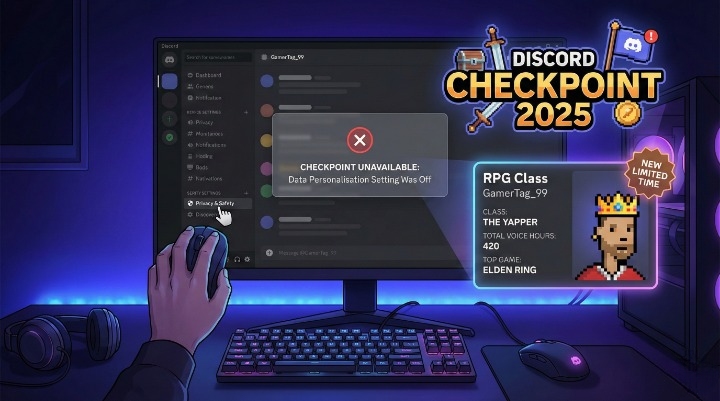
Everyone on your server is sharing their “RPG-style” stat cards right now. You see screenshots of their top games, voice hours, and even a “Sidekick” rating. Naturally, you want to see your own. You open the app, look for the banner, and… nothing.
Or worse, you find the tab, but it simply says “Checkpoint Unavailable.”
You are not alone. Discord has officially launched Discord Checkpoint 2025, their answer to the “Wrapped” trend. It offers a deep dive into your gaming and chatting habits from the past year. But for many users in the UK and worldwide, accessing this data has become a confusing headache.
This guide is your fix. We will walk you through exactly how to access your Checkpoint on Desktop and Mobile, how to claim your limited-time Avatar Decoration, and the honest reason why your stats might be missing this year.
What is Discord Checkpoint 2025?
Think of Discord Checkpoint as a gamer’s report card. For years, users begged for a “Discord Wrapped.” Third-party bots tried to fill the gap, but they were often clunky or unsafe. Now, Discord has built the feature directly into the platform.
It does not just count messages. It creates a narrative about your digital life. The 2025 edition tracks specific metrics:
-
Voice & Stream Duration: Total hours spent in voice channels.
-
Top Games: What you played while Discord was running.
-
Communication Style: Are you a “Yapper” or a “Lurker”?
-
Top Connections: Who you spoke to the most (your “Sidekick”).
It packages all this data into shareable, RPG-themed cards. You can download these images to share on X (Twitter) or Instagram, which is exactly why the FOMO (Fear Of Missing Out) is so high right now.
How to Find Your Discord Checkpoint (Step-by-Step)
The rollout for this feature is slightly different depending on your device. Discord often pushes updates to Desktop first, so check there if your phone app seems empty.
Viewing on Desktop & Browser
This is usually the most reliable way to trigger the review.
-
Update Your App: Press
Ctrl + R(Windows) orCmd + R(Mac) to force a refresh of the Discord client. -
Locate the Flag: Look at the top-right corner of your screen. You should see a new Flag icon sitting between your Inbox and the Help question mark.
-
Click the Banner: If the icon is missing, check the top of your Direct Messages (DM) list. Discord often places a “Your Checkpoint is here!” banner right above your friends list.
Viewing on Mobile (Android & iOS)
The mobile experience can be trickier because app store updates are often staggered.
-
Check for Updates: Go to the Google Play Store or Apple App Store. Ensure you are on the absolute latest version of Discord.
-
Go to the ‘You’ Tab: Tap your profile picture in the bottom right corner.
-
Find the Sparkles: You should see a banner labelled “Your Discord Checkpoint is here” with a sparkle icon.
-
Force Close: If it is not there, fully close the app (swipe it away) and reopen it.
Pro-Tip: If the mobile app refuses to show the banner, do not waste time reinstalling. Just log in via a mobile web browser (like Chrome or Safari) and request the “Desktop Site” version. It often works when the app fails.
Why is Discord Checkpoint Unavailable? (Troubleshooting)
This is the most critical part of this guide.
Millions of users are clicking the banner only to see an error message or finding no banner at all. If you are frustrated, I understand. I have dug into the official documentation and community reports to find the cause.
In 90% of cases, it comes down to one specific privacy setting.
The “Data Personalisation” Privacy Trap
Discord takes privacy seriously. This is generally a good thing, but it causes issues for features like Checkpoint.
To generate your Year-in-Review, Discord needs permission to track what you do. Specifically, they need the setting “Use data to personalise my Discord experience” to be enabled.
The Hard Truth: If you had this setting turned OFF during 2024 and 2025, Discord did not collect the necessary data to build your report.
Turning the setting on today will not fix it for 2025. The data simply does not exist. It is like asking a camera to show you a photo it never took. This is the main reason users see the “Unavailable” error.
Account Age & Activity Requirements
Even with privacy settings enabled, you might still miss out. According to official support guidelines, you must meet these criteria:
-
Account Age: Your account must have been active for a significant portion of the year. New accounts created in November or December 2025 likely won’t have enough data.
-
Minimum Activity: You need “measurable activity.” If you only use Discord to read announcements and never join voice chats or send messages, the system cannot generate a “Style” for you.
How to Enable Data Settings for Next Year (2026)
If you missed out this year, you can fix it for the next one right now.
-
Go to User Settings (the gear icon).
-
Select Privacy & Safety.
-
Scroll down to the section regarding data.
-
Toggle ON “Use data to personalise my Discord experience.”
[Official Discord Support Article on Data Privacy]
Decoding Your Stats: What Do The Cards Mean?
If you were lucky enough to get your Checkpoint, you likely received an “RPG Class.” Discord uses your activity to assign you a personality type. Here is a breakdown of the most common ones users are reporting.
Your RPG “Class” & Personality
-
The Yapper: You spend hours in voice chat or send thousands of messages. You are the life of the server.
-
The Lurker: You read everything but say nothing. You have high “read” stats but low “sent” stats.
-
The Strategist: You spend most of your time in game-specific servers or have high activity while a strategy game is running.
Your Top “Sidekick”
This card often surprises people. Your “Sidekick” is the person you interacted with the most. This combines direct messages (DMs), replies, and time spent in two-person voice calls.
Note: If your Sidekick is someone you barely know, it might be because you both fell asleep in the same voice channel overnight. Discord counts those hours!
How to Claim Your Free Avatar Decoration
The best part of Discord Checkpoint 2025 is the free loot. Discord is giving away a special Avatar Decoration to everyone who completes their review.
-
Open your Checkpoint.
-
Scroll through all the stat cards until you reach the end.
-
Click the “Claim Reward” button.
-
Go to your Edit Profile screen and select “Change Decoration.”
Important: This is a limited-time item. According to current in-app notices, you must claim and equip this decoration before January 15, 2026. After that date, it may disappear from the shop, though claimed items usually stay in your inventory.
Discord Checkpoint vs. Spotify Wrapped: A Quick Comparison
How does Discord’s effort stack up against the king of viral marketing, Spotify Wrapped?
Discord’s version feels more personal for gamers because it validates the hours we sink into our hobbies. Spotify tells you what you heard, but Discord tells you who you are.
Frequently Asked Questions (People Also Ask)
Is Discord Checkpoint 2025 legit or a scam?
It is 100% legit. However, be careful of fake links sent by bots. Only access Checkpoint through the official Discord app banner or the notification flag. Never click suspicious links sent in DMs promising “Premium Checkpoint.”
How do I see my Discord Checkpoint on iPhone?
Ensure your app is updated via the App Store. Open the app, tap your profile picture to go to the “You” tab, and tap the “Sparkles” banner. If it is missing, try the desktop version.
Why is the Discord Checkpoint tab missing?
This usually means your app is outdated, or you did not have “Data Personalisation” turned on previously. It can also happen if your account is too new.
Can I view Discord Checkpoint if I was banned?
If your account is currently disabled or banned, you cannot access the platform to view the stats.
Does Discord Checkpoint include private messages?
It counts the number of messages sent in DMs to determine your activity levels, but it does not read the content of your private messages for the summary.
Conclusion
Discord Checkpoint 2025 is a fantastic addition to the platform, giving us a fun, nostalgic look at our year in gaming. It turns raw data into a social event.
However, the “Unavailable” errors serve as a sharp reminder about the trade-off between privacy and personalisation. If you want the fun features, you have to give the platform permission to watch.
If you missed out this year because of your privacy settings, do not worry. You can toggle them on now, grab the free Avatar Decoration if possible, and be ready to compare stats with your squad in 2026.
Did you get a rare RPG class on your card? Drop your Discord ‘Persona’ in the comments below!
About the Author